|
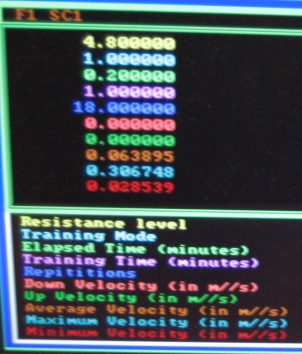
The PC/104 computer runs a Simulink model on its xPC operating system. This model consists of Simulink blocks to control signal flow and four major embedded Matlab programs to process data and run the finger training program. In addition to the motor control, the program provides 10 outputs that are displayed on a VGA monitor for the purpose of user feedback. These ouputs are as follows:
- Resistance level
- Training mode
- Elapsed time
- Training time
- Repitions
- Down velocity of last repition
- Up velocity of last repition
- Average session velocity
- Maximum session velocity
- Minimum session velocity
Download the Model
The Simulink control model is available here for download.
Calculations
The Simulink program takes the input of the Hall sensor and processes it to output first an angle according to the calibration and then a distance in centimeters. This distance is an input into the embedded Matlab control program. The output of the program is a number between 0 and 1 that is multiplied with the selected resistance level from the potentiometer. This value is added to a constant force that counteracts gravity and then converted into an output voltage to send to the motor amplifier.
Embedded Matlab
There are four main Matlab functions, one that processes the keypad inputs, one that runs the training program, one that controls the motor resistance, and one that calculates and tracks all of the velocities.
The first Matlab function simply takes the three voltage inputs coming from the keypad and sets the mode, time, and turns the program off and on. There are three training modes, one that has no delay in between repitions, one that has a three second delay, and one that has a random delay between zero and five seconds. The training times are one minute, five minutes, and twenty minutes. The on button starts the program, which will run until either time runs out or the off button is pressed.
The second major Matlab program turns the motor controller on and off. This is accomplished by checking if the program should be running, starting the motor sequence, waiting until the motor sequence has finished, waiting the appropriate amount of time depending on the chosen mode and then restarting the motor sequence.
The third Matlab function is the motor sequence. When activated, the program cycles through five states and outputs a force multiplyer between 0 and 1. The first state linearly increases the multiplyer to 1 in a short time period to tell the user to begin. The second state applies a constant upward force through the force multiplyer until a certain distance is reached. When that distance is reached, the third state switches the multiplyer linearly from 1 to -1 to reverse the force. The fourth state outputs a constant -1 multiplyer until the user has returned the paddle to the original location. This activates the last state, which linearly increases the multiplyer to 0 so the user knows the trial has been completed.
The last major Matlab function calculates the down and up velocities for each trial. These velocities are then incorporated into the average velocity and compared to the maximum and minimum velocities for the session and saved if outside of the current max or min.
|