|
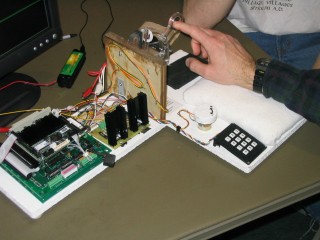
Our project was very successful. We achieved the performance we wanted out of the haptic paddle and a very good interface with the user. The haptic paddle provides a constant force, which is what was desired by Dr. Campbell. The user interface includes a keypad and knob for user inputs and a monitor for outputs. We used a computer monitor; however, a smaller screen would be preferred.
Finger Trainer in Action
Two videos are available in .avi format for viewing:
Video clip 1 (2.8 MB)
Video clip 2 (5.6 MB)
Reflections
The main problem we ran into was during our Simulink programming. We tried to take a real-time derivative of the Hall sensor input signal and use it as a velocity switch to activate the force, but found it very difficult. Trying to do real-time derivatives was complicated by the amount of noise in the Hall sensor signal, which resulted in instability of the system. We spent a lot of time trying to fix noise in our signal, trying both electronic (filtering) and software (filtering and averaging) solutions. However, we found it much easier to use a different method all together. One of the problems we found while trying to get rid of noise was that the power outputs of the PC/104 stack were quite noisy themselves. To combat this we used a 7805 chip which takes an input voltage (we used +12 Volts) and has a +5 Volt output. This helped a little but not enough to make the real-time derivative work as a velocity switch for the force.
Simulink Lessons Learned
- Embedded Matlab is a powerful way to incorporate conventional programming
- Memory blocks are a convenient way to store state and Matlab variables
- Unit delays can also store Matlab variables if only used by one Matlab program
- Any delays and variables must have appropriate initial values which must match vector dimensions if the variable is a vector
- Long Matlab codes often need troubleshooting in the main window before they will compile
- Gains are good for adjusting variables while the model is running
- Outputs to Matlab are very useful for toubleshooting signals
|